Installing on Android
Step-by-step instructions for installing the Stokkd app to your Android phone or tablet's home screen, so you can log in and start counting.
Overview
Stokkd is a Progressive Web App (PWA) — it works like a native app but installs directly from your browser, with no app store required. On Android phones and tablets, installing Stokkd to your home screen is required before you can log in.
Prerequisites
- An Android phone or tablet
- The Chrome browser (recommended — other Chromium-based browsers also work)
- Active internet connection for the initial install
- Your Stokkd account credentials (provided by your company administrator)
Installing to Your Home Screen
Step 1: Open Stokkd in Chrome
- On your Android device, open Chrome
- Navigate to
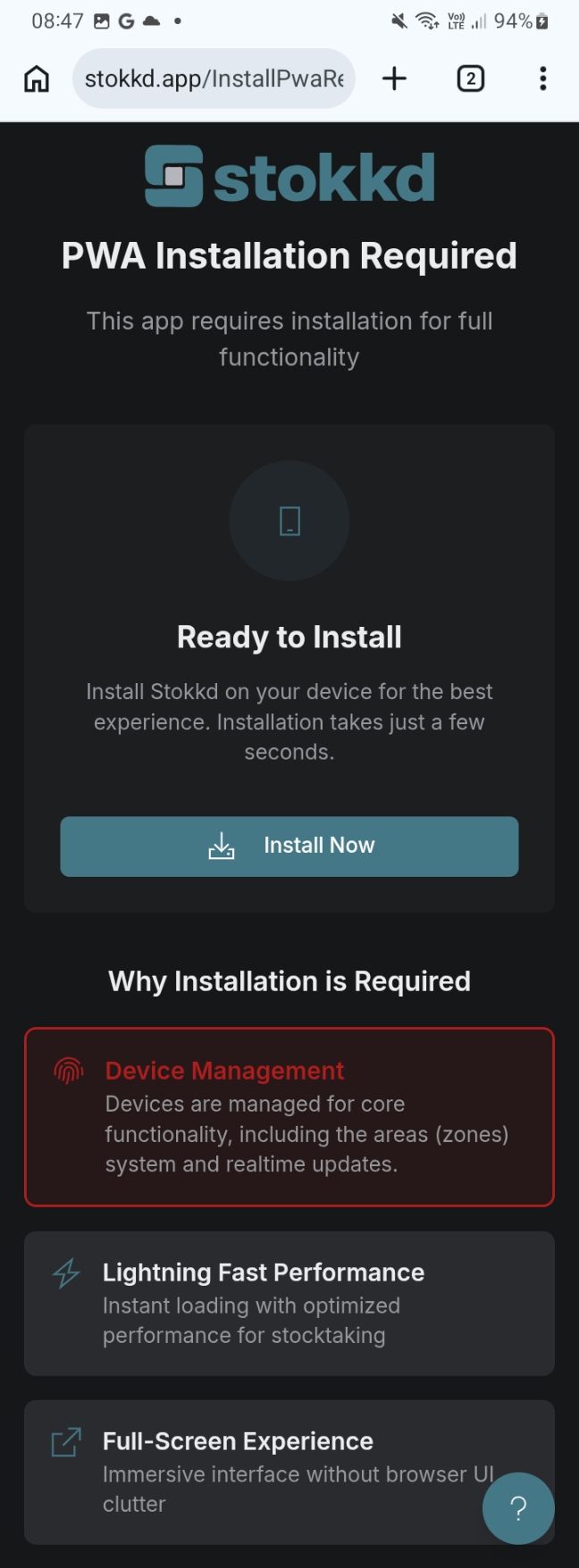
https://stokkd.app - You'll see an installation screen — the app must be installed before you can proceed
Step 2: Install the App
1. Look for the Install button displayed in the instruction card on screen 2. Tap Install3. Confirm the installation when prompted 4. Edit the name if desired (default: "Stokkd") 5. Tap Add or Install6. The Stokkd icon appears on your home screen
Note: Some Android devices may also show an install prompt in the browser address bar. If you don't see the install button in the instruction card, use Chrome's menu (⋮) → Add to Home screen or Install app instead.
Step 3: Log In and Start Using
Find the Stokkd icon on your home screen

Tap to launch the app
Log in with your credentials
You're ready to use the app
The app opens in fullscreen mode without browser controls, giving you a native app experience.
Why is installation required? Installing to your home screen ensures the best performance, reliability, and enables required functionality.
Tips & Best Practices
- Always launch from the home screen icon, not the browser
- Keep the app updated — when prompted to update, reload for the latest fixes and features
- Charge your device fully before starting a stocktake
Having issues? See the Mobile App Troubleshooting guide for installation problems.